Let's take some data
We will need an open dataset that is large and interesting to work with.
| dataset | rows | modality |
|---|
| Photos — YFCC100M / Multimedia Commons | 99,155,288 | images |
| Comments — Hacker News | 37,799,159 | text |
| Websites — a web crawl | 18,988,131 | screenshot + text |
Photos
Yahoo Flickr Creative Commons 100 Million — published in 2014.
Every photo is Creative Commons licensed, with metadata:
title, description, tags, user, camera, timestamp, and often coordinates.
Multimedia Commons is the derived dataset on AWS Open Data —
the images themselves, one resized JPEG per photo, in a public bucket:
s3://multimedia-commons/data/images/{a}/{bc}/{md5}.jpg
Photos
So I did:
Downloaded all metadata:
— 100M images, 13 GB compressed, 42 GB uncompressed.
Downloaded all images:
— 99.57M images, 12 TB JPEG, also in ClickHouse in String.
Calculated thumbnails:
— 99.13M images, 1.5 TB, 75x75 px RGB in Array(UInt8).
Link 1 |
Link 2
Comments: Hacker News
The dataset is public and self-updating in ClickHouse:
CREATE TABLE hackernews_history UUID '259cf9f0-0c4f-451d-9029-7de661f9a085'
(
  update_time DateTime, id UInt32, deleted UInt8,
  type Enum('story'=1,'comment'=2,'poll'=3,'pollopt'=4,'job'=5),
  by LowCardinality(String), time DateTime, text String, dead UInt8,
  parent UInt32, poll UInt32, kids Array(UInt32), url String,
  score Int32, title String, parts Array(UInt32), descendants Int32
)
ENGINE = ReplacingMergeTree(update_time)
ORDER BY id
SETTINGS refresh_parts_interval = 60,
  disk = disk(readonly = true, type = 's3_plain_rewritable',
    endpoint = 'https://clicklake-test-2.s3.eu-central-1.amazonaws.com/',
    use_environment_credentials = false);
Comments: Hacker News
If you copy-paste this CREATE TABLE query
in clickhouse-client or clickhouse-local,
it will attach the prepared dataset for you with no data copying.
The text is HTML, so it has to be cleaned before processing:
SELECT id, decodeHTMLComponent(extractTextFromHTML(text))
FROM hackernews_history
How does it look? Link
The Internet: a web crawl
18,988,131 websites.
I took the list of top websites from CrUX (Chrome UX report),
then set up a script that requests the front page,
records as much metadata about the website as possible, saves the content,
and takes a screenshot using a headless Chrome with Playwright,
ran it in AWS Lambda, and waited a few weeks...
Result: 395 TB of goodness, 189 TB compressed!
— AWS security kindly asked me what I'm doing 😅
— colleagues kindly asked me what I'm doing 🥹
The Internet: a web crawl
CREATE TABLE default.web
(
    data JSON(
        screenshot Array(UInt8),
        timestamp DateTime64(3),
        url String)
)
ORDER BY (data.url, data.timestamp);
A single JSON column with everything (10 MB compressed per record).
SELECT DISTINCT arrayJoin(JSONAllPaths(data)) FROM web
The Internet: a web crawl
What is a vector embedding?
It can mean at least five slightly different things...
1. In a general, mathematical sense:
— embedding is an injective map from a set (of anything) into space*,
so that the map preserves some properties.
Example: a geographical map is an embedding
of a segment of sphere in a 2d plane.
But this definition is too generic...
* this definition can be further generalized or specified.
What is a vector embedding?
2. Historical example (2013): word2vec.
A map from words to vectors learned to give similar vectors to words that often have the same context (same neighbour words) in a text corpus.
Similar examples: GloVe, fastText. Typical number of dimensions: 50..300.
A vector is just a sequence of floating-point numbers:
king -> [1.203125,-1.6953125,-0.859375,-1.0546875,0.31835938,...,0.875]
Classic: king + woman − man ≈ queen
This is also not what we are interested in.
What is a vector embedding?
3. Token embeddings in a transformer model.
Every LLM starts with tokenizing the text.
Then every token (and also every position) is mapped to a vector.
Then these vectors are fed to the model layers.
'Every'   -> [0.55859375,-1.921875,0.74609375,1.640625,  ...,-0.64453125]
' L'      -> [-0.625,-0.14160156,-1.2265625,-0.33398438,   ...,0.7890625]
'LM'      -> [-1.171875,0.453125,1.25,1.59375,               ...,-1.4375]
' starts' -> [-0.98046875,1.0625,-0.7421875,1.21875,         ...,-0.8125]
' with'   -> [-1.6015625,-0.46679688,2.671875,0.58203125,...,-0.46484375]
' token'  -> [-0.546875,-0.1484375,0.25390625,-0.63671875,...,0.24511719]
'izing'   -> [0.79296875,-0.34570312,-1.0078125,0.875,         ...,0.625]
' the'    -> [-0.00592041,0.203125,0.23535156,-0.34960938,...,-0.8984375]
' text'   -> [-0.765625,0.11767578,1.9140625,-0.625,      ...,0.14550781]
'.'       -> [0.31445312,1.1484375,0.74609375,0.60546875, ...,0.12695312]
This is also not what we need!
What is a vector embedding?
4. Model activations as embeddings.
Run a transformer over the text and take a hidden state:
— the last token's state, or the mean over all tokens, from layer N.
This works - the vector does carry meaning.
This is not the best for direct usage as an embedding,
but the best embedding models (e.g., Qwen3-Embedding-8B)
are created by fine-tuning on top of the corresponding generative LLMs.
This is also not what we need!
What is a vector embedding?
5. Models trained for the job.
Contrastive training: pull similar pairs together, push everything else apart.
The training decides what "similar" means, so there are several families:
— similarity: two sentences that mean the same thing;
— retrieval: a question must be close to a passage that answers it
— which is asymmetric, hence prefixes:
'search_query: ' vs 'search_document: ';
— multimodal retrieval: CLIP, SigLIP — images and their captions
land in one shared space, so you can search photos with words;
— and question answering, code search, instructions...
What is a vector embedding?
Bonus: Sparse embeddings (bag of words model, 1970)
A very large vector, where each dimension corresponds to one possible word from the dictionary (10k+ dimensions) and contains its frequency in the given phrase (with variations like TF-IDF, BM25).
— dimension = vocabulary size, but only tens of non-zeros per document;
— exact lexical matching, fully interpretable;
— modern versions are learned sparse: SPLADE expands the query
into related terms, keeping the inverted-index shape.
In this project I added one as a baseline: an 8192-dimensional hashed
bag of words over Hacker News comments — built entirely in SQL.
I want to calculate embeddings...
All of them. And store them in ClickHouse!
What models are available?
— MTEB leaderboard
The 22 models I used
| model | year | params | dims | licence |
|---|
| Images — 99.2M photos, 17.8M screenshots |
| siglip2-so400m-patch16-512 | 2025 | 1.1B | 1152 | Apache-2.0 |
| nomic-embed-vision-v1.5 | 2024 | 93M | 768 | Apache-2.0 |
| CLIP ViT-L/14 | 2021 | 428M | 768 | MIT |
| Text — 37.8M comments, 19.0M pages |
| Qwen3-Embedding-8B | 2025 | 7.6B | 4096 | Apache-2.0 |
| embeddinggemma-300m | 2025 | 303M | 768 | Gemma |
| nomic-embed-text-v1.5 | 2024 | 137M | 768 | Apache-2.0 |
| KaLM-embedding-mini-instruct-v1.5 | 2024 | 494M | 896 | MIT |
| jina-embeddings-v3 | 2024 | 572M | 1024 | CC-BY-NC |
| jina-embeddings-v2-small-en | 2023 | 33M | 512 | Apache-2.0 |
| granite-embedding-30m-english | 2024 | 30M | 384 | Apache-2.0 |
| snowflake-arctic-embed-xs | 2024 | 23M | 384 | Apache-2.0 |
| snowflake-arctic-embed-m | 2024 | 109M | 768 | Apache-2.0 |
| e5-small-v2 | 2023 | 33M | 384 | MIT |
| e5-base-v2 | 2023 | 109M | 768 | MIT |
| e5-large-v2 | 2023 | 335M | 1024 | MIT |
| gte-small | 2023 | 33M | 384 | MIT |
| gte-base | 2023 | 109M | 768 | MIT |
| bge-small-en-v1.5 | 2023 | 33M | 384 | MIT |
| bge-base-en-v1.5 | 2023 | 109M | 768 | MIT |
| bge-large-en-v1.5 | 2023 | 335M | 1024 | MIT |
| all-MiniLM-L6-v2 | 2021 | 23M | 384 | Apache-2.0 |
| bag of words (hashed, TF) | 1970 | — | 8192 | — |
All 22 are
open-weight — the closed APIs (Gemini Embedding, Nemotron-VL over OpenRouter) were
trialled and dropped: per-token pricing does not survive 100 million rows.
Option 1: open models on a GPU
For the 99 million photos:
| model | dims | table |
|---|
| google/siglip2-so400m-patch16-512 | 1152 | emb_siglip2 |
| open_clip ViT-L-14 (openai) | 768 | emb_clip |
| nomic-ai/nomic-embed-vision-v1.5 | 768 | emb_nomic |
One g6.12xlarge (4× NVIDIA L4), spot, in the same region as the bucket.
All three models loaded on every GPU, so the S3 read and the JPEG decode
are amortized across them.
Wall time: about a day. Cost: $50–200 for 300 million embeddings.
Text: nineteen models
For the Hacker News comments, from smallest to largest:
384-d: all-MiniLM-L6-v2, snowflake-arctic-embed-xs, bge-small-en-v1.5, gte-small, e5-small-v2, granite-embedding-30m
512–768-d: jina-embeddings-v2-small, arctic-embed-m, bge-base-en-v1.5, gte-base, e5-base-v2, nomic-embed-text-v1.5, embeddinggemma-300m
896–1024-d: KaLM-embedding-multilingual-mini, bge-large-en-v1.5, e5-large-v2, jina-embeddings-v3
4096-d: Qwen3-Embedding-8B
8192-d sparse: the bag-of-words baseline
The 30M-parameter models take hours. The 8B ones take days
— and the 4096-dimensional table alone is 1.1 TiB.
Option 2: an API
Do it from inside ClickHouse, since 26.6:
# /etc/clickhouse-server/config.d/openrouter.yaml
named_collections:
    openrouter:
        provider: openai        # OpenRouter speaks the OpenAI API
        endpoint: https://openrouter.ai/api/v1/embeddings
        api_key: sk-or-v1-...
SELECT aiEmbed(review_text, 'google/gemini-embedding-2',
               map('credentials', 'openrouter')) AS embedding
FROM reviews LIMIT 10;
Option 3: make them yourself
You do not always need a model. A hashed bag of words, a TF-IDF vector,
a vector of aggregated features - these are embeddings too,
and ClickHouse can build them with SQL.
The bag of words on this map was built by one INSERT SELECT:
INSERT INTO hackernews_embeddings_bow
WITH 8192 AS vec_size,
  tokens(lowerUTF8(decodeHTMLComponent(extractTextFromHTML(text)))) AS toks,
  arrayMap(x -> cityHash64(x) % vec_size, toks) AS tokens_idx,
  arrayMap(j -> toFloat32(countEqual(tokens_idx, j)), range(vec_size)) AS vec,
  (vec / if(L2Norm(vec) > 0, L2Norm(vec), 1))::Array(BFloat16) AS embedding
SELECT id, embedding FROM hackernews_history
WHERE id >= {lo:UInt32} AND id < {hi:UInt32}
What embeddings can do for you?
What can embeddings do?
Search. Nearest neighbours by distance — text, images, or text → images.
Classification. The vector is a feature vector; a linear model on top of it
is usually enough, and needs only a few hundred labels.
Mapping to other spaces. Project to 2-D to look at it, reduce dimensions
to make it cheap, or map one model's space into another's.
Also: clustering, deduplication, recommendations, anomaly detection,
and RAG (which is just search with extra steps).
Distances in high-dimensional spaces
Embeddings are trained with respect to a similarity function,
which can be the L2 distance, cosine distance, or dot product.
Almost all modern embedding models produce unit-normalized vectors,
which means their L2 norm equals 1 - the vectors are divided by their length before output.
As all vectors have length 1, they are located on an n-dimensional sphere.
For normalized vectors, all similarity functions are in a monotonic relation with each other, so they can be used interchangeably.
Dot product aka scalar product of two vectors is the sum of products of their i-th coordinates. L2 distance aka Euclidean distance is the L2 norm of the difference between vectors. L2 norm of a vector is the sqrt of the dot product of vec with itself - a vector length. Cosine similarity is the normalized dot product: the dot product divided by the norms of both vectors. It is the cosine of the angle between two vectors, ranging from -1 to 1. Don't confuse cosine similarity and cosine distance which is 1 - cosineSimilarity(v, u) so it is non-negative and has the right direction.
How to think about high-dimensional spaces?
High dimensional spaces break the intuition:
— the volume of a unit sphere (ball) converges to zero;
— most of the volume of a cube or a ball is near its border;
— the distance between random points of a unit cube goes to infinity;
— random vectors are almost orthogonal;
— random vectors on a sphere have L2 distance close to sqrt(2);
— most of vector coordinates on a unit sphere are close to zero;
— coordinates of a random vector on a unit sphere have a Gaussian distribution N(0, 1/sqrt(ndims));
Spheres,
Cubes, More cubes.
How to store embeddings efficiently?
For raw data, use the 16-bit data type at most.
Do not use Float64 or Float32. ClickHouse provides BFloat16.
16-bit floating point data type does not lose any precision on embeddings.
And most modern models already use no more than 16-bit for inference.
Example: Qwen3-8B has 4096 dimensions, and on 37.8M comments,
— the whole table without embeddings - 12 GB
— embeddings in Float64 - 1.24 TB
— embeddings in Float32 - 620 GB
— embeddings in BFloat16 - 310 GB.
In most cases you will store further quantized data!
How to store embeddings efficiently?
Quantization:
— representing vectors with a lower number of bits per coordinate.
Practical options can be as low as 1..4 bit per dimension.
Dimensionality reduction:
— representing vectors with a lower number of dimensions.
Good results on search and retrieval even with 384 dimensions
out of initial 4096.
Example: 2 bit with 384 dimensions takes only 3.6 GB.
How to store embeddings efficiently?
Check if embeddings are "good" - centered and unit-normalized.
Most of modern models produce normalized embeddings.
-- should return something close to 1.
SELECT avg(L2Norm(embedding)) FROM hackernews_embeddings;

-- should return values close to 0 for each coordinate.
SELECT avgForEach(embedding) FROM hackernews_embeddings;

-- should return values close to 1 for each coordinate, ok if less on a dataset.
SELECT stddevForEach(embedding) * sqrt(any(length(embedding)))
FROM hackernews_embeddings;
Note: most models output unit-normalized embeddings, so that the L2Norm ≈ 1 and stddev of a coordinate ≈ 1 / sqrt(ndims),
but some models output normalized embeddings, so that L2Norm ≈ sqrt(ndims) and stddev of a coordinate ≈ 1.
The difference is only in scaling.
You may need to normalize embeddings for further steps.
Rotating spaces
If we rotate the whole space randomly,
the distances and angles don't change.
But the information is better spread across coordinates, even if it was concentrated.
If applied before quantization, rotation improves the search quality on quantized data.
There is a family of orthogonal matrices allowing fast multiplication,
and ClickHouse has a function for that!
randomHadamardTransform(vec)
Nomic embeddings of Flickr photos, without rotation, orthogonal projection on 2D.
Nomic embeddings of Flickr photos, with rotation, orthogonal projection on 2D.
randomHadamardTransform
SELECT randomHadamardTransform([1., 2., 3., 4.]::Array(Float32));
-- [0, 2, 1, -5]   an orthogonal, norm-preserving rotation

SELECT randomHadamardTransform(v, seed);       -- a different rotation
SELECT randomHadamardTransform(v, seed, 256);  -- rotate, then truncate
— deterministic: the same seed always gives the same rotation,
so it can be a MATERIALIZED column and a query can reproduce it;
— norm-preserving, so unit vectors stay unit vectors;
— the truncated form is a Johnson–Lindenstrauss random projection;
Int8 Quantization
Half the storage compared to BFloat16.
Map every dimension to a number −128..127 so we can reconstruct the approximate original values,
while minimizing the distance calculation error.
The algorithm - use a lookup table, assuming that the value has Gaussian distribution N(0, 1).
ClickHouse has a function for that!
-- pack Array(BFloat16) into Array(Int8)
SELECT quantizeBFloat16ToInt8(embedding * sqrt(length(embedding)))
FROM hackernews_embeddings;
-- unpack Array(Int8) into reconstructed original values of Array(BFloat16)
SELECT dequantizeInt8ToBFloat16(quantized) / sqrt(length(quantized))
FROM hackernews_embeddings;
QBit Data Type
A data type for vector embeddings,
that allows tuning the search precision at runtime.
CREATE TABLE vectors (
    id UInt64, name String, ...
    vector QBit(BFloat16, 1536)
) ORDER BY ();
SELECT id, name FROM vectors
ORDER BY L2DistanceTransposed(vector, target, 10)
LIMIT 10;
QBit: bit-sliced layout
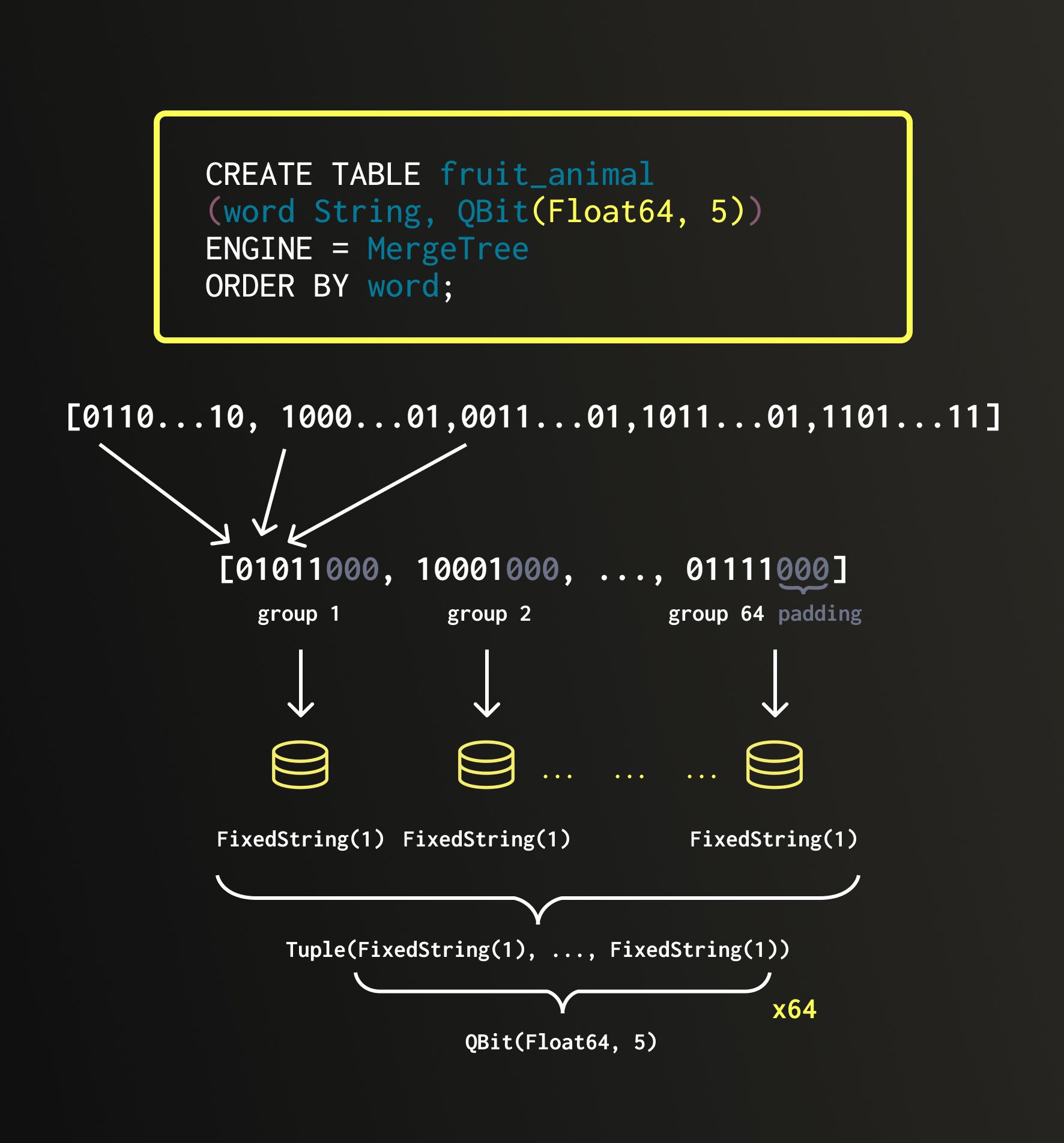
It uses a bit-sliced data layout:
every number is sliced by bits,
e.g., for 1536-dim vector of BFloat16,
we store 16 subcolumns with Nth (1..16th) bits from all dimensions.
At the query time, we specify, how many (most significant) bits to take.
For example, we can ask to read
only 10 out of 16 bits.
QBit: Int8 quantization
QBit supports Int8, which allows anything from binary (1 bit) to full 8 bit quantization, chosen at runtime per query.
It can store any Int8 codes, and we also provide quantizeBFloat16ToInt8 and dequantizeInt8ToBFloat16 functions for optimal conversion from Float to Int8, minimizing the error on gaussian-distributed vector coordinates.
CREATE TABLE images (id UInt64, emb QBit(Int8, 2048)) …;

INSERT INTO images
SELECT id, quantizeBFloat16ToInt8(embedding * sqrt(2048)) FROM src;
-- scale unit-normalized embeddings by sqrt(dim) and convert to Int8

SELECT id FROM images
ORDER BY cosineDistanceTransposedQuantized(emb, target, 4) LIMIT 10;
-- reads only the top 4 bit-planes — half the I/O of 8-bit
QBit: strided storage
The optional stride parameter slices dimensions into groups — each bit-plane of
each group is its own stream on disk: QBit(Int8, 1024, 256):
|
dims 1–256 |
257–512 |
513–768 |
769–1024 |
| bit 1 (sign) | | | | |
| bit 2 | | | | |
| bit 3 | | | | |
| bit 4 | | | | |
| bit 5 … 8 | | | | |
… ORDER BY cosineDistanceTransposedQuantized(emb, target, 4, 256) …
-- 4 bits × first 256 dims: reads the 4 green streams of 32 — 3% of a Float32 column
You can request reading only first N dimensions - good for:
- rotated embeddings with randomHadamardTransform;
- MRL (Matryoshka Representation Learning) embeddings to tune between the speed and recall.
Dimensionality reduction
For search, retrieval, and analytics:
— Use first N dimensions for distance calculation on rotated embeddings, e.g., 384 from 4096 with the QBit data type.
For data exploration and visualization:
— Use UMAP (see also: t-SNE) - learned dimensionality reduction to a low-dimensional space, 2D/3D.
Photos — linear projection
99 million photos, SigLIP2, Hadamard-rotated, projected to 2-D by summing slices. A sphere, as promised.
Photos — UMAP
The same 99 million photos. Hue is a fourth UMAP component; brightness is density.
The same photos — CLIP ViT-L/14
Bonus
ClickHouse also supports vector indices:
— HNSW for fast in-memory similarity search
(often you don't need it, as QBit solves the problem perfectly)
And ready-made quantization codecs:
— e.g., RaBitQ, Turboquant (based on 8-dimensional sphere packing).
What Else?
ClickHouse is the best DBMS for analytic applications:
— Fast, scalable, and resource efficient;
— Easy to use and pleasant to work with;
— Robust and reliable;
— Batteries included.
Friends tell friends to use ClickHouse!